The Best Mental Math Apps in 2026: How to Pick the Right One
Mental math apps fall into three kinds: trick-teaching courses, timed drills and brain-training games. Here’s what each is good for, with examples, and how to choose.
On this page
Search the App Store or Google Play for “mental math” and you’ll find hundreds of apps. Most of them fall into one of three kinds, and the right one depends on what you want: to learn new methods, to get faster at what you already know, or to keep your brain busy in general.
This guide explains the three kinds, gives well-known examples of each and ends with a checklist to help you choose. App features and prices change and vary by country, so check the store listing before you download.
1. Trick-teaching apps: learn the methods
These apps teach you how to calculate faster: rounding and adjusting, splitting numbers, multiplying by 11, squaring numbers ending in 5 and so on. They explain each method, then give you practice with it.
Choose this kind if you want to become genuinely faster, not just quicker at the methods you already use.
Mathlite (iPhone, iPad and Android)
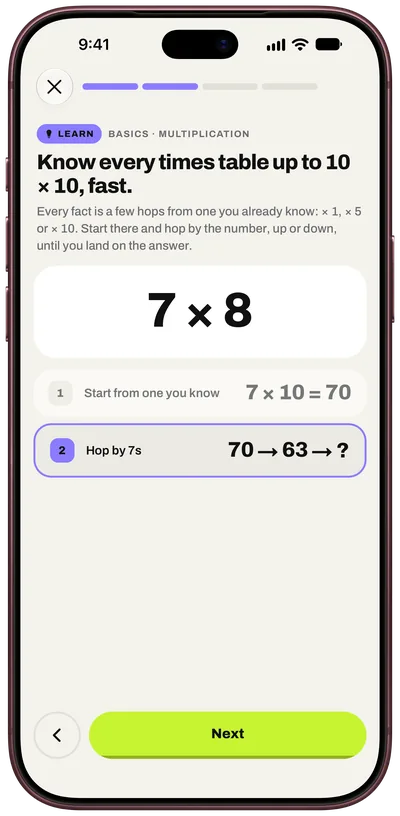
Mathlite is built around one trick per lesson. Each lesson shows the trick on a worked example, step by step, then lets you try it with a hint, then gives you practice that adapts to your level. Lessons are grouped into topics, from addition and subtraction to multiplication, division, fractions, percentages, everyday math, squares, time and estimation.
It also has timed sprints of 30, 60 or 120 seconds, and old tricks come back in your sprints before you forget them. A placement test at the start finds your level. Mathlite is free to download with the first lesson free, and Mathlite Pro unlocks everything, with a free trial on the yearly plan. It’s available in 14 languages.
Mathemagics: Mental Math (iOS)
One of the longest-running trick apps, Mathemagics focuses on speed techniques for multiplying, dividing and squaring, with learn, practice and play modes. It suits people who mainly want multiplication and squaring shortcuts.
2. Drill apps: get faster at the basics
Drill apps give you a stream of problems, often timed, by operation and difficulty: addition, subtraction, times tables, division, sometimes square roots. They don’t usually teach methods, but they’re excellent for speed and for making facts automatic.
Choose this kind if you already know your methods and want quick, repeatable speed practice, for example before a test.
Examples include the many “Math Workout” style apps, which let you pick categories such as times tables or mixed practice, a difficulty level and a number of questions, and “Mental Math”, a simple open-source trainer for Android with practice and timed modes.
3. Brain-training suites: math as one skill among many
Brain-training apps mix short games for memory, attention, language and math. The math games tend to be practical, such as comparing prices or working out discounts.
Choose this kind if you want variety and general mental exercise more than a focused math skill.
Elevate (iOS and Android)
Elevate is a well-known brain-training app with dozens of short games, including math games built around everyday situations like splitting bills and calculating discounts. It has a limited free version and a subscription.
How to choose: a quick checklist
| Your goal | Look for | Kind of app |
|---|---|---|
| Get genuinely faster | Lessons that teach methods, then practice | Trick-teaching |
| Prepare for a timed test | Timed rounds, mixed problems, your weak areas | Drills, or trick-teaching with sprints |
| Learn the times tables | Adaptive practice and review | Drills or trick-teaching |
| Keep your mind active | Variety and short daily sessions | Brain-training suite |
| Practise in your language | Full translations, not only the store page | Check the listing |
Whatever you choose, a few features make a big difference:
- A placement test or levels, so problems are hard enough to help but not so hard you give up.
- Review, so tricks and facts come back before you forget them.
- Short sessions, because five minutes a day you actually do beats an hour you skip.
- Progress you can see, such as speed over time, streaks or best scores.
The bottom line
If you want to learn new methods and get faster for good, pick an app that teaches tricks and then drills them. If you just want speed practice on what you already know, a drill app is enough. And if you want general brain exercise with some math, a brain-training suite fits.
Mathlite combines the first two: a trick in every lesson, practice that adapts to you and timed sprints that review what you’ve learned. It’s free to try on iPhone, iPad and Android.

Practise this in Mathlite
Every trick in this article is a lesson in Mathlite, with worked examples and practice that adapts to you.
Frequently asked questions
What is the best app to improve mental math?
It depends on your goal. To get genuinely faster, choose an app that teaches tricks and then drills them, such as Mathlite or Mathemagics. For quick daily speed practice, a drill app works well. For general brain training with some math, a suite like Elevate fits.
Are mental math apps worth it?
Yes, if you use them regularly. Five minutes a day with an app that teaches and reviews tricks does more than occasional long sessions, because speed comes from repetition.
Are there free mental math apps?
Many drill apps are free, and several paid apps have a free tier or a free trial. Mathlite is free to download with your first lesson free, and Mathlite Pro has a free trial on the yearly plan.
Can adults use mental math apps?
Yes. Many are designed for adults, for example to prepare for job tests, brush up for work or keep sharp. Look for an app that starts with a placement test so it matches your level.